<?xml version="1.0" encoding="utf-8"?><feed xmlns="http://www.w3.org/2005/Atom" ><generator uri="https://jekyllrb.com/" version="4.4.1">Jekyll</generator><link href="https://cabauman.github.io/ko/feed.xml" rel="self" type="application/atom+xml" /><link href="https://cabauman.github.io/ko/" rel="alternate" type="text/html" /><updated>2026-07-12T07:49:55+00:00</updated><id>https://cabauman.github.io/feed.xml</id><title type="html">Colt’s Code Journal</title><subtitle>The purpose of this site is to share insights into my day-to-day development experiences, mostly related to C# and game dev with Unity.</subtitle><author><name>Colt Bauman</name></author><entry xml:lang="en"><title type="html">March 2024 Recap</title><link href="https://cabauman.github.io/ko/march-2024-recap/" rel="alternate" type="text/html" title="March 2024 Recap" /><published>2024-03-24T00:00:00+00:00</published><updated>2024-03-24T00:00:00+00:00</updated><id>https://cabauman.github.io/march-2024-recap</id><content type="html" xml:base="https://cabauman.github.io/march-2024-recap/"><![CDATA[<p>Because I’m not able to keep up with writing a post every time I have something interesting to share, I’ll sometimes just briefly summarize highlights over the past 1/2/3/4 weeks; in this case, the month of March.</p>

<h2 id="csv-record-too-large-error">“csv record too large” error</h2>

<p>When attempting to read a file using an open source csv library called <a href="https://github.com/MarkPflug/Sylvan/blob/a6f722cb2c0c536452a193822ec0c50011268961/docs/Csv/Sylvan.Data.Csv.md">Sylvan.Data.Csv</a> I encountered a <code class="language-plaintext highlighter-rouge">CsvRecordTooLargeException</code>.The error kept occurring at the same line number: 598,191.</p>

<blockquote>
  <p>The exception that is thrown when a single CSV record is too large to fit in the read buffer.
CsvRecordTooLargeException is typically an indication of a incorrectly formatted CSV file.
Most CSV files should easily fit the constraints of the default buffer size. It is possible
to increase the buffer size for exceptional cases. <a href="https://github.com/MarkPflug/Sylvan/blob/a6f722cb2c0c536452a193822ec0c50011268961/source/Sylvan.Data.Csv/Exceptions.cs#L44">source</a></p>
</blockquote>

<p>Something was obviously not formatted correctly. I was unable to read the whole line without it throwing an exception, even with plain PowerShell commands. So, I wrote a .NET Console application script to read line-by-line until the problematic line and then read one character at a time.</p>

<div class="language-csharp highlighter-rouge"><div class="highlight"><pre class="highlight"><code><span class="k">static</span> <span class="k">void</span> <span class="nf">Main</span><span class="p">(</span><span class="kt">string</span><span class="p">[]</span> <span class="n">args</span><span class="p">)</span>
<span class="p">{</span>
    <span class="kt">string</span> <span class="n">filePath</span> <span class="p">=</span> <span class="s">@"path_to_the_csvs\PDP_20220601.csv"</span><span class="p">;</span>
    <span class="kt">int</span> <span class="n">lineNumberThatThrows</span> <span class="p">=</span> <span class="m">598191</span><span class="p">;</span>

    <span class="kt">string</span> <span class="n">nullCharCount</span> <span class="p">=</span> <span class="nf">GetNullCharCount</span><span class="p">(</span><span class="n">filePath</span><span class="p">,</span> <span class="n">lineNumberThatThrows</span><span class="p">);</span>
    <span class="n">Console</span><span class="p">.</span><span class="nf">WriteLine</span><span class="p">(</span><span class="s">$"Null char count: </span><span class="p">{</span><span class="n">nullCharCount</span><span class="p">}</span><span class="s">"</span><span class="p">);</span>
<span class="p">}</span>

<span class="k">static</span> <span class="kt">string</span> <span class="nf">GetNullCharCount</span><span class="p">(</span><span class="kt">string</span> <span class="n">filePath</span><span class="p">,</span> <span class="kt">int</span> <span class="n">lineNumberThatThrows</span><span class="p">)</span>
<span class="p">{</span>
    <span class="k">using</span> <span class="p">(</span><span class="n">StreamReader</span> <span class="n">reader</span> <span class="p">=</span> <span class="k">new</span> <span class="nf">StreamReader</span><span class="p">(</span><span class="n">filePath</span><span class="p">))</span>
    <span class="p">{</span>
        <span class="kt">int</span> <span class="n">currentLineNumber</span> <span class="p">=</span> <span class="m">1</span><span class="p">;</span>

        <span class="c1">// Read lines normally until reaching the desired line number</span>
        <span class="k">while</span> <span class="p">(</span><span class="n">currentLineNumber</span> <span class="p">&lt;</span> <span class="n">lineNumberThatThrows</span><span class="p">)</span>
        <span class="p">{</span>
            <span class="n">reader</span><span class="p">.</span><span class="nf">ReadLine</span><span class="p">();</span>
            <span class="n">currentLineNumber</span><span class="p">++;</span>
        <span class="p">}</span>

        <span class="c1">// Read characters one by one to see what's going on...</span>
        <span class="kt">long</span> <span class="n">nullCharCount</span> <span class="p">=</span> <span class="m">0</span><span class="p">;</span>
        <span class="kt">int</span> <span class="n">validCharCount</span> <span class="p">=</span> <span class="m">0</span><span class="p">;</span>
        <span class="kt">int</span> <span class="n">nextChar</span><span class="p">;</span>
        <span class="k">while</span> <span class="p">(</span><span class="k">true</span><span class="p">)</span>
        <span class="p">{</span>
            <span class="k">if</span> <span class="p">((</span><span class="n">nextChar</span> <span class="p">=</span> <span class="n">reader</span><span class="p">.</span><span class="nf">Read</span><span class="p">())</span> <span class="p">==</span> <span class="p">-</span><span class="m">1</span><span class="p">)</span>
            <span class="p">{</span>
                <span class="n">Console</span><span class="p">.</span><span class="nf">WriteLine</span><span class="p">(</span><span class="s">"End of file reached."</span><span class="p">);</span>
                <span class="k">break</span><span class="p">;</span>
            <span class="p">}</span>
            <span class="kt">char</span> <span class="n">character</span> <span class="p">=</span> <span class="p">(</span><span class="kt">char</span><span class="p">)</span><span class="n">nextChar</span><span class="p">;</span>
            <span class="k">if</span> <span class="p">(</span><span class="n">character</span> <span class="p">==</span> <span class="sc">'\0'</span><span class="p">)</span>
            <span class="p">{</span>
                <span class="n">nullCharCount</span><span class="p">++;</span>
                <span class="k">continue</span><span class="p">;</span>
            <span class="p">}</span>
            <span class="n">validCharCount</span><span class="p">++;</span>
        <span class="p">}</span>

        <span class="n">Console</span><span class="p">.</span><span class="nf">WriteLine</span><span class="p">(</span><span class="s">$"Valid char count: </span><span class="p">{</span><span class="n">validCharCount</span><span class="p">}</span><span class="s">"</span><span class="p">);</span>

        <span class="k">return</span> <span class="n">nullCharCount</span><span class="p">.</span><span class="nf">ToString</span><span class="p">();</span>
    <span class="p">}</span>
<span class="p">}</span>
</code></pre></div></div>

<p>The output was</p>

<blockquote>
  <p>End of file reached.<br />
Valid char count: 240<br />
Null char count: 11_464_439_842</p>
</blockquote>

<p>That’s over 11 billion null characters 🤯 With the diagnosis resolved, we reported the corrupted file and moved on.</p>

<h2 id="ispointerovergameobject-related-bug">IsPointerOverGameObject-related bug</h2>

<p>After removing the new Input System package from a project, <code class="language-plaintext highlighter-rouge">IsPointerOverGameObject()</code> started always returning false on iOS. This caused bug where the camera would pan around when the user is dragging UI (uGUI), like a slider or scroll view. Turns out there’s an overload where you can supply a “pointerId”, so I just needed to supply the <code class="language-plaintext highlighter-rouge">fingerId</code>:</p>

<div class="language-csharp highlighter-rouge"><div class="highlight"><pre class="highlight"><code><span class="n">EventSystem</span><span class="p">.</span><span class="n">current</span><span class="p">.</span><span class="nf">IsPointerOverGameObject</span><span class="p">(</span><span class="n">Input</span><span class="p">.</span><span class="nf">GetTouch</span><span class="p">(</span><span class="m">0</span><span class="p">).</span><span class="n">fingerId</span><span class="p">)</span>
</code></pre></div></div>

<p>I guess the new Input System handles that behind the scenes. But you may be wondering why we removed it, in the first place. I’m a fan of the Input System package so I added it when I joined the project. But we just never got around to migrating existing code to use it, so I decided to drop it to prevent unnecessary work being done in the background.</p>

<h2 id="getting-rid-of-per-frame-allocations">Getting rid of per-frame allocations</h2>

<p>As my team and I are getting close to wrapping up the second phase of a project, I decided to go “allocation hunting” in the profiler to seek out optimization opportunities. The easiest ones to spot are those that occur every frame, and I found 3 this time, all related to delegates.</p>

<p>The first one was related to sorting popups by distance from the camera.</p>

<div class="language-csharp highlighter-rouge"><div class="highlight"><pre class="highlight"><code><span class="k">private</span> <span class="k">void</span> <span class="nf">Update</span><span class="p">()</span>
<span class="p">{</span>
    <span class="p">...</span>
    <span class="n">_popups</span><span class="p">.</span><span class="nf">Sort</span><span class="p">((</span><span class="n">a</span><span class="p">,</span> <span class="n">b</span><span class="p">)</span> <span class="p">=&gt;</span> <span class="p">{</span> <span class="p">});</span>
    <span class="p">...</span>
<span class="p">}</span>
</code></pre></div></div>

<p>The problem here is that a lambda gets allocated every frame. It’s using the <code class="language-plaintext highlighter-rouge">Sort(Comparison&lt;T&gt;)</code> overload, where <code class="language-plaintext highlighter-rouge">Comparison&lt;T&gt;</code> is a custom delegate. I’ve resolved issues like this before by caching the delegate, but I noticed there’s also an <code class="language-plaintext highlighter-rouge">IComparer&lt;T&gt;</code> overload, so out of curiosity I decided to give that a shot first.</p>

<div class="language-csharp highlighter-rouge"><div class="highlight"><pre class="highlight"><code><span class="n">PopupSortComparer</span> <span class="n">_sortComparer</span><span class="p">;</span>

<span class="k">private</span> <span class="k">void</span> <span class="nf">Update</span><span class="p">()</span>
<span class="p">{</span>
    <span class="p">...</span>
    <span class="n">_popups</span><span class="p">.</span><span class="nf">Sort</span><span class="p">(</span><span class="n">_sortComparer</span><span class="p">);</span>
    <span class="p">...</span>
<span class="p">}</span>

<span class="k">private</span> <span class="k">class</span> <span class="nc">PopupSortComparer</span> <span class="p">:</span> <span class="n">IComparer</span><span class="p">&lt;</span><span class="n">PopupBase</span><span class="p">&gt;</span> <span class="p">{</span> <span class="p">...</span> <span class="p">}</span>
</code></pre></div></div>

<p>where <code class="language-plaintext highlighter-rouge">_sortComparer</code> is initialized in <code class="language-plaintext highlighter-rouge">Awake</code>.</p>

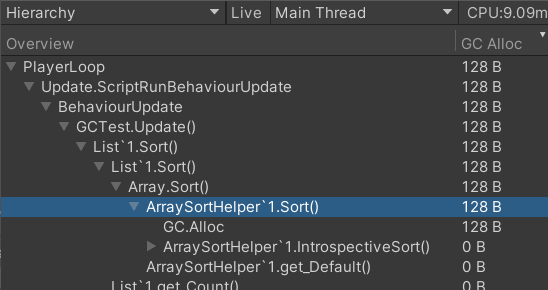
<p>But profiling revealed that even supplying a cached comparer to <code class="language-plaintext highlighter-rouge">List&lt;T&gt;.Sort</code> results in per-frame-allocations. After turning on deep profiling, I found that the source is <code class="language-plaintext highlighter-rouge">ArraySortHelper&lt;T&gt;.Sort</code>.</p>

<p><img src="/assets/images/deep-profile-list-sort-allocation.png" alt="deep-profile-list-sort-allocation" /></p>

<p>So I checked the .NET source code and found that it’s due to the method group: <a href="https://github.com/dotnet/runtime/blob/80a5260004d82d6dd04aa2603cae354522b8eeb0/src/libraries/System.Private.CoreLib/src/System/Collections/Generic/ArraySortHelper.cs#L26">comparer.Compare</a> being passed to <code class="language-plaintext highlighter-rouge">IntrospectiveSort</code>.</p>

<div class="language-csharp highlighter-rouge"><div class="highlight"><pre class="highlight"><code><span class="n">ArraySortHelper</span><span class="p">&lt;</span><span class="n">T</span><span class="p">&gt;.</span><span class="nf">IntrospectiveSort</span><span class="p">(</span><span class="n">keys</span><span class="p">,</span> <span class="n">comparer</span><span class="p">.</span><span class="n">Compare</span><span class="p">);</span>
</code></pre></div></div>

<p>Caching the delegate gets rid of repeated allocations, as expected, but I’m glad I tried out <code class="language-plaintext highlighter-rouge">IComparer</code> for the sake of awareness.</p>

<div class="language-csharp highlighter-rouge"><div class="highlight"><pre class="highlight"><code><span class="n">Comparison</span><span class="p">&lt;</span><span class="n">PopupBase</span><span class="p">&gt;</span> <span class="n">_sortComparison</span><span class="p">;</span>

<span class="k">private</span> <span class="k">void</span> <span class="nf">Update</span><span class="p">()</span>
<span class="p">{</span>
    <span class="p">...</span>
    <span class="n">_popups</span><span class="p">.</span><span class="nf">Sort</span><span class="p">(</span><span class="n">_sortComparison</span><span class="p">);</span>
    <span class="p">...</span>
<span class="p">}</span>
</code></pre></div></div>

<h3 id="graph-and-chart-allocations">Graph and Chart Allocations</h3>

<p>I found that the other 2 sources of per-frame-allocations were the same kind as the first: delegates. Except this time happening in an Asset Store library called <a href="https://assetstore.unity.com/packages/tools/gui/graph-and-chart-lite-edition-148497">Graph and Chart - Lite Edition</a> (which is a great library, by the way; it saved us a lot of time).</p>

<div class="language-csharp highlighter-rouge"><div class="highlight"><pre class="highlight"><code><span class="kt">bool</span> <span class="nf">DoSlider</span><span class="p">(</span><span class="n">Slider</span> <span class="n">s</span><span class="p">)</span>
<span class="p">{</span>
    <span class="k">return</span> <span class="n">s</span><span class="p">.</span><span class="nf">UpdateSlider</span><span class="p">(</span><span class="k">this</span><span class="p">);</span>
<span class="p">}</span>

<span class="c1">// Called by Unity's Update method</span>
<span class="k">protected</span> <span class="k">void</span> <span class="nf">UpdateSliders</span><span class="p">()</span>
<span class="p">{</span>
    <span class="n">mSliders</span><span class="p">.</span><span class="nf">RemoveAll</span><span class="p">(</span><span class="n">DoSlider</span><span class="p">);</span>
<span class="p">}</span>
</code></pre></div></div>

<p>See the problem? The method group <code class="language-plaintext highlighter-rouge">DoSlider</code> is passed to <code class="language-plaintext highlighter-rouge">RemoveAll</code> every frame.</p>

<p>The fixed version only allocates once at init time:</p>

<div class="language-csharp highlighter-rouge"><div class="highlight"><pre class="highlight"><code><span class="k">private</span> <span class="n">Predicate</span><span class="p">&lt;</span><span class="n">Slider</span><span class="p">&gt;</span> <span class="n">mPredicate</span><span class="p">;</span>

<span class="k">private</span> <span class="k">void</span> <span class="nf">Awake</span><span class="p">()</span>
<span class="p">{</span>
    <span class="n">mPredicate</span> <span class="p">=</span> <span class="n">DoSlider</span><span class="p">;</span>
<span class="p">}</span>

<span class="kt">bool</span> <span class="nf">DoSlider</span><span class="p">(</span><span class="n">Slider</span> <span class="n">s</span><span class="p">)</span>
<span class="p">{</span>
    <span class="k">return</span> <span class="n">s</span><span class="p">.</span><span class="nf">UpdateSlider</span><span class="p">(</span><span class="k">this</span><span class="p">);</span>
<span class="p">}</span>

<span class="k">protected</span> <span class="k">void</span> <span class="nf">UpdateSliders</span><span class="p">()</span>
<span class="p">{</span>
    <span class="n">mSliders</span><span class="p">.</span><span class="nf">RemoveAll</span><span class="p">(</span><span class="n">mPredicate</span><span class="p">);</span>
<span class="p">}</span>
</code></pre></div></div>

<h2 id="plastic-scm-commit-messages-to-release-notes">Plastic SCM commit messages to release notes</h2>

<p>My team and I are using Plastic SCM for our current project, which is my first experience with it. And we’re at the phase where we’re creating regular releases. But the release notes were manual. I’ve created many GitHub Workflows and Actions throughout my career, including conventional commit parsers for generating release notes, but unfortunately nothing I could use for Plastic. I eventually decided to take a day to learn the CLI commands and try to piece together a minimal solution. I have a little experience using Python, so that was my language of choice. I didn’t want to spend much time on this, so I tried using Chat GPT, but it really sucks at the Plastic CLI syntax. I finally got something decent working. Not pretty but gets the job done.</p>

<p><a href="https://gist.github.com/cabauman/f4ce4f4d916f512a9a3c416494cf5b99">Here’s the gist</a> for those that are interested.</p>

<p>The basic logic is</p>

<div class="language-python highlighter-rouge"><div class="highlight"><pre class="highlight"><code><span class="n">changesetid</span> <span class="o">=</span> <span class="nf">get_last_label</span><span class="p">()</span>
<span class="k">if</span> <span class="n">changesetid</span><span class="p">:</span>
    <span class="n">commit_messages</span> <span class="o">=</span> <span class="nf">get_commit_messages_since_label</span><span class="p">(</span><span class="n">changesetid</span><span class="p">)</span>
    <span class="n">commit_messages</span> <span class="o">=</span> <span class="nf">filter_commit_messages</span><span class="p">(</span><span class="n">commit_messages</span><span class="p">)</span>
    <span class="n">message_groups</span> <span class="o">=</span> <span class="nf">group_commit_messages</span><span class="p">(</span><span class="n">commit_messages</span><span class="p">)</span>
    <span class="nf">print</span><span class="p">(</span><span class="sh">"</span><span class="s">Commit messages since last label:</span><span class="sh">"</span><span class="p">)</span>
    <span class="k">for</span> <span class="n">prefix</span><span class="p">,</span> <span class="n">messages</span> <span class="ow">in</span> <span class="n">message_groups</span><span class="p">.</span><span class="nf">items</span><span class="p">():</span>
        <span class="nf">print</span><span class="p">(</span><span class="sa">f</span><span class="sh">"</span><span class="si">{</span><span class="n">prefix</span><span class="si">}</span><span class="sh">"</span><span class="p">)</span>
        <span class="k">for</span> <span class="n">message</span> <span class="ow">in</span> <span class="n">messages</span><span class="p">:</span>
            <span class="nf">print</span><span class="p">(</span><span class="n">message</span><span class="p">)</span>
<span class="k">else</span><span class="p">:</span>
    <span class="nf">print</span><span class="p">(</span><span class="sh">"</span><span class="s">No labels found.</span><span class="sh">"</span><span class="p">)</span>
</code></pre></div></div>

<h2 id="google-play-developer-account-warning">Google Play Developer Account Warning</h2>

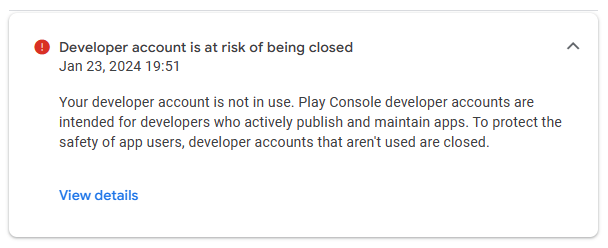
<p>Back in January I received a warning notification about my Google Play Developer account, saying it’s at risk of being closed because I haven’t published or updated any apps in a long time. Apparently, they started <a href="https://www.xda-developers.com/google-play-policy-crack-down-on-dormant-accounts/">cracking down</a> on dormant accounts a few years ago.</p>

<p><img src="/assets/images/google-play-account-warning.png" alt="google-play-account-warning" /></p>

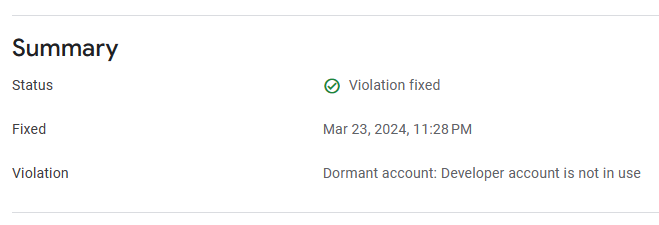
<p>The deadline for me to publish or update an app was set at March 23rd. I had one Korean study app published sometime between 2016 and 2018, but I eventually unpublished it because of changing interests and limited time, and haven’t done anything else with my account since. It was developed with Android Studio + Java. Every once in a while, within the past five years, I experiment with the idea of doing a remake with .NET Maui (the successor to Xamarin). Anyways, I discovered that even if my account gets closed, I’m allowed to sign up for a new one with a different email. Even so, I decided to try to beat the deadline by publishing a minimal Korean verb conjugator app, with the intention of later evolving it into that remake I mentioned. This included learning how to write a privacy policy because it’s a requirement these days. The first three months of this year have been crazy because of work, so I actually did most of the development in the last couple weeks and finally submitted an apk for publishing on March 22nd 😄 It’s still in review, but looks like submission was enough to save my account because I found the following message in my notification archive:</p>

<p><img src="/assets/images/google-play-account-warning-fixed.png" alt="google-play-account-warning-fixed" /></p>

<p>Maybe this was the nudge I needed to get back into creating/publishing projects. After this Korean app, I’ll have my sights set on developing games.</p>]]></content><author><name>Colt Bauman</name></author><category term="Code Journal" /><category term="C#" /><category term="optimization" /><category term="Unity" /><category term="allocations" /><summary type="html"><![CDATA[Because I’m not able to keep up with writing a post every time I have something interesting to share, I’ll sometimes just briefly summarize highlights over the past 1/2/3/4 weeks; in this case, the month of March.]]></summary></entry><entry xml:lang="en"><title type="html">Resolving a Bug Related to ‘Marshal.SizeOf vs Unsafe.SizeOf&apos;</title><link href="https://cabauman.github.io/ko/marshal-vs-unsafe-sizeof-bug/" rel="alternate" type="text/html" title="Resolving a Bug Related to ‘Marshal.SizeOf vs Unsafe.SizeOf&apos;" /><published>2024-02-18T00:00:00+00:00</published><updated>2024-02-18T00:00:00+00:00</updated><id>https://cabauman.github.io/marshal-vs-unsafe-sizeof-bug</id><content type="html" xml:base="https://cabauman.github.io/marshal-vs-unsafe-sizeof-bug/"><![CDATA[<p>In this post I’m going to share how switching from <code class="language-plaintext highlighter-rouge">Marshal.SizeOf&lt;T&gt;</code> to <code class="language-plaintext highlighter-rouge">Unsafe.SizeOf&lt;T&gt;</code> helped me resolve a bug that I had a left a TODO comment for a month or two ago, along with a work-around. It’s not that the former is broken, but rather I had made the wrong choice for my particular use case. Thanks to my improved understanding of the differences between these two SizeOf variations, I felt it was time to try to address that TODO comment.</p>

<p class="notice--info">In order to make this as understandable as possible, I’ll be using simplified versions of the actual code, and excluding parts that would otherwise distract us from the main focus.</p>

<p class="notice--info">This code is from a Unity project but it doesn’t touch any Unity-specific API, so you’ll probably see me using <code class="language-plaintext highlighter-rouge">Console.WriteLine</code> to demonstrate printing.</p>

<p>So without further ado, here’s the snippet of interest:</p>

<figure class="highlight"><pre><code class="language-csharp" data-lang="csharp"><table class="rouge-table"><tbody><tr><td class="gutter gl"><pre class="lineno">1
2
3
4
5
6
7
8
9
10
</pre></td><td class="code"><pre><span class="kt">var</span> <span class="n">data</span> <span class="p">=</span> <span class="k">new</span> <span class="n">TValue</span><span class="p">[</span><span class="n">structCount</span><span class="p">];</span>
<span class="c1">// TODO: Find out why ReadArray is returning wrong values but reading one-by-one is fine.</span>
<span class="c1">//accessor.ReadArray(position: 0, array: data, offset: 0, count: data.Length);</span>
<span class="kt">var</span> <span class="n">structSize</span> <span class="p">=</span> <span class="n">Marshal</span><span class="p">.</span><span class="n">SizeOf</span><span class="p">&lt;</span><span class="n">T</span><span class="p">&gt;();</span>
<span class="k">for</span> <span class="p">(</span><span class="kt">var</span> <span class="n">i</span> <span class="p">=</span> <span class="m">0</span><span class="p">;</span> <span class="n">i</span> <span class="p">&lt;</span> <span class="n">structCount</span><span class="p">;</span> <span class="n">i</span><span class="p">++)</span>
<span class="p">{</span>
    <span class="kt">var</span> <span class="n">byteOffset</span> <span class="p">=</span> <span class="n">i</span> <span class="p">*</span> <span class="n">structSize</span><span class="p">;</span>
    <span class="n">accessor</span><span class="p">.</span><span class="n">Read</span><span class="p">&lt;</span><span class="n">TValue</span><span class="p">&gt;(</span><span class="n">byteOffset</span><span class="p">,</span> <span class="k">out</span> <span class="kt">var</span> <span class="k">value</span><span class="p">);</span>
    <span class="n">data</span><span class="p">[</span><span class="n">i</span><span class="p">]</span> <span class="p">=</span> <span class="k">value</span><span class="p">;</span>
<span class="p">}</span>
</pre></td></tr></tbody></table></code></pre></figure>

<p>Line 3 is the statement I had to comment out because it wasn’t working as expected, while the for loop is the “unsatisfying workaround”. Unsatisfying for a couple reasons:</p>

<ol>
  <li>reading one-by-one is not as performant</li>
  <li>not knowing the “why”</li>
</ol>

<p class="notice--info"><code class="language-plaintext highlighter-rouge">accessor</code> is of type <a href="https://learn.microsoft.com/en-us/dotnet/api/system.io.memorymappedfiles.memorymappedviewaccessor?view=net-8.0">MemoryMappedViewAccessor</a>. I’ll cover this in a future post. For now, just know that it’s acting as a binary file reader.</p>

<p>The commented out code works fine when the struct type contains only ints, floats, doubles, etc. The issue only surfaced when it tried to read a struct type that contains boolean values. Let’s walk through an example using the following struct definition.</p>

<div class="language-csharp highlighter-rouge"><div class="highlight"><pre class="highlight"><code><span class="k">struct</span> <span class="nc">MyStruct</span>
<span class="p">{</span>
    <span class="k">public</span> <span class="kt">bool</span> <span class="n">MyBool</span><span class="p">;</span>
<span class="p">}</span>
</code></pre></div></div>

<p>We’ll start by writing 2 instances of this struct to a binary file.</p>

<div class="language-csharp highlighter-rouge"><div class="highlight"><pre class="highlight"><code><span class="k">public</span> <span class="k">static</span> <span class="k">void</span> <span class="n">WriteStructs</span><span class="p">&lt;</span><span class="n">T</span><span class="p">&gt;(</span><span class="n">T</span><span class="p">[]</span> <span class="n">structs</span><span class="p">)</span>
    <span class="k">where</span> <span class="n">T</span> <span class="p">:</span> <span class="k">unmanaged</span>
<span class="p">{</span>
    <span class="kt">var</span> <span class="n">structSize</span> <span class="p">=</span> <span class="n">Marshal</span><span class="p">.</span><span class="n">SizeOf</span><span class="p">&lt;</span><span class="n">T</span><span class="p">&gt;();</span>
    <span class="kt">var</span> <span class="n">bytes</span> <span class="p">=</span> <span class="k">new</span> <span class="kt">byte</span><span class="p">[</span><span class="n">structs</span><span class="p">.</span><span class="n">Length</span> <span class="p">*</span> <span class="n">structSize</span><span class="p">];</span>
    <span class="c1">// convert structs to bytes...</span>
    <span class="n">File</span><span class="p">.</span><span class="nf">WriteAllBytes</span><span class="p">(</span><span class="n">BinaryFilePath</span><span class="p">,</span> <span class="n">bytes</span><span class="p">);</span>
<span class="p">}</span>

<span class="kt">var</span> <span class="n">myStructs</span> <span class="p">=</span> <span class="k">new</span> <span class="n">MyStruct</span><span class="p">[]</span>
<span class="p">{</span>
   <span class="k">new</span><span class="p">()</span> <span class="p">{</span> <span class="n">MyBool</span> <span class="p">=</span> <span class="k">true</span> <span class="p">},</span>
   <span class="k">new</span><span class="p">()</span> <span class="p">{</span> <span class="n">MyBool</span> <span class="p">=</span> <span class="k">true</span> <span class="p">}</span>
<span class="p">};</span>
<span class="nf">WriteStructs</span><span class="p">(</span><span class="n">myStructs</span><span class="p">);</span>
</code></pre></div></div>

<p>This results in a binary file with a size of 8 bytes.</p>

<p>What? 8 bytes for 2 bool values?</p>

<blockquote>
  <p>Although the bool type in C# is only 1 byte in size (sizeof(bool) == 1), the CLR defaults to marshalling it as the unmanaged BOOL type. This is the size you get when you call Marshal.SizeOf. BOOL is a typedef in the Windows SDK headers for an int, which is 4 bytes in size. Why? Because these headers were written for the C language at a time that this language did not have a first-class Boolean type. It does now, but the decisions are fixed in stone for backwards-compatibility reasons. The CLR marshals bool types this way in order to be compatible with Windows API functions that use BOOL values. <a href="https://stackoverflow.com/questions/39251727/c-sharp-structlayout-pack-for-use-with-bool-values/39251864#39251864">source</a></p>
</blockquote>

<p>Okay, good to know. Let’s just roll with this for now.</p>

<p>Printing out the bytes gives the following: <code class="language-plaintext highlighter-rouge">1,0,0,0,1,0,0,0</code></p>

<p>Now it’s clear why the for loop in the first snippet works fine: it uses <code class="language-plaintext highlighter-rouge">Marshal.SizeOf&lt;T&gt;</code> just like the <code class="language-plaintext highlighter-rouge">WriteStructs</code> method. The 2 <code class="language-plaintext highlighter-rouge">bool</code> values we get are <code class="language-plaintext highlighter-rouge">True,True</code> when printing the result:</p>

<div class="language-csharp highlighter-rouge"><div class="highlight"><pre class="highlight"><code><span class="kt">var</span> <span class="n">str</span> <span class="p">=</span> <span class="kt">string</span><span class="p">.</span><span class="nf">Join</span><span class="p">(</span><span class="s">","</span><span class="p">,</span> <span class="n">myStructs</span><span class="p">.</span><span class="nf">Select</span><span class="p">(</span><span class="n">x</span> <span class="p">=&gt;</span> <span class="n">x</span><span class="p">.</span><span class="n">MyBool</span><span class="p">));</span>
<span class="n">Console</span><span class="p">.</span><span class="nf">WriteLine</span><span class="p">(</span><span class="n">str</span><span class="p">);</span>
</code></pre></div></div>

<p>But what if we try using commented out code?</p>

<div class="language-csharp highlighter-rouge"><div class="highlight"><pre class="highlight"><code><span class="n">accessor</span><span class="p">.</span><span class="nf">ReadArray</span><span class="p">(</span><span class="n">position</span><span class="p">:</span> <span class="m">0</span><span class="p">,</span> <span class="n">array</span><span class="p">:</span> <span class="n">data</span><span class="p">,</span> <span class="n">offset</span><span class="p">:</span> <span class="m">0</span><span class="p">,</span> <span class="n">count</span><span class="p">:</span> <span class="n">data</span><span class="p">.</span><span class="n">Length</span><span class="p">);</span>
</code></pre></div></div>

<p>The 2 <code class="language-plaintext highlighter-rouge">bool</code> values end up being <code class="language-plaintext highlighter-rouge">True,False</code> 🤔</p>

<p>If we take a look at the <code class="language-plaintext highlighter-rouge">ReadArray</code> source code, we can see a call to <a href="https://github.com/dotnet/runtime/blob/37445d4964a50eeff87ca7ed8cbdf251b547b779/src/libraries/System.Private.CoreLib/src/System/IO/UnmanagedMemoryAccessor.cs#L333"><code class="language-plaintext highlighter-rouge">SafeBuffer.AlignedSizeOf&lt;T&gt;()</code></a>, which ultimately <a href="https://github.com/dotnet/runtime/blob/ab888616590c1f9654694af735d1f429fd27e26b/src/libraries/System.Private.CoreLib/src/System/Runtime/InteropServices/SafeBuffer.cs#L409">calls sizeof(T)</a>.</p>

<p><code class="language-plaintext highlighter-rouge">sizeof(MyStruct)</code> returns 1. That means <code class="language-plaintext highlighter-rouge">ReadArray</code> was only reading the first 2 bytes instead of all 8. Being that the file bytes are <code class="language-plaintext highlighter-rouge">1,0,0,0,1,0,0,0</code>, it now makes sense why it returned <code class="language-plaintext highlighter-rouge">True,False</code>. We can try reading 8 structs from that same file to further prove this theory.</p>

<div class="language-csharp highlighter-rouge"><div class="highlight"><pre class="highlight"><code><span class="n">accessor</span><span class="p">.</span><span class="nf">ReadArray</span><span class="p">(</span><span class="m">0</span><span class="p">,</span> <span class="n">data</span><span class="p">,</span> <span class="m">0</span><span class="p">,</span> <span class="m">8</span><span class="p">);</span>
<span class="c1">// returns: True,False,False,False,True,False,False,False</span>
</code></pre></div></div>

<p>This brings us to the difference between the two.</p>

<blockquote>
  <p><a href="https://learn.microsoft.com/en-us/dotnet/csharp/language-reference/operators/sizeof">sizeof(T)</a> returns the size of a type in managed memory, and <code class="language-plaintext highlighter-rouge">Marshal.SizeOf</code> returns the size of a type in <em>unmanaged</em> memory.</p>
</blockquote>

<p class="notice--info"><code class="language-plaintext highlighter-rouge">sizeof(T)</code> and <code class="language-plaintext highlighter-rouge">Unsafe.SizeOf&lt;T&gt;</code> are equivalent in the sense that they both return the <em>managed size</em> of a type, and they even compile down to the same IL instruction. The only difference is that <code class="language-plaintext highlighter-rouge">sizeof</code> only works when <code class="language-plaintext highlighter-rouge">T</code> is <a href="https://learn.microsoft.com/en-us/dotnet/csharp/language-reference/builtin-types/unmanaged-types">unmanaged</a>, and requires the <code class="language-plaintext highlighter-rouge">unsafe</code> keyword when used with custom structs.</p>

<h2 id="conclusion">Conclusion</h2>

<p>So the bug was caused by mixing two different interpretations of size: managed and unmanaged. The binary utility that this code is part of has nothing to do with interop - it only reads and writes C# types - so <code class="language-plaintext highlighter-rouge">Marshal.SizeOf</code> is the wrong tool for the job. After swapping out all the <code class="language-plaintext highlighter-rouge">Marshal.SizeOf&lt;T&gt;</code> calls for <code class="language-plaintext highlighter-rouge">Unsafe.SizeOf&lt;T&gt;</code> I was able to replace the workaround with <code class="language-plaintext highlighter-rouge">ReadArray</code>, offically resolving the TODO comment.</p>

<div class="language-csharp highlighter-rouge"><div class="highlight"><pre class="highlight"><code><span class="kt">var</span> <span class="n">data</span> <span class="p">=</span> <span class="k">new</span> <span class="n">TValue</span><span class="p">[</span><span class="n">structCount</span><span class="p">];</span>
<span class="n">accessor</span><span class="p">.</span><span class="nf">ReadArray</span><span class="p">(</span><span class="n">position</span><span class="p">:</span> <span class="m">0</span><span class="p">,</span> <span class="n">array</span><span class="p">:</span> <span class="n">data</span><span class="p">,</span> <span class="n">offset</span><span class="p">:</span> <span class="m">0</span><span class="p">,</span> <span class="n">count</span><span class="p">:</span> <span class="n">data</span><span class="p">.</span><span class="n">Length</span><span class="p">);</span>
</code></pre></div></div>

<p>Unravelling this bug would have been a daunting task if I used a struct with many different fields and a binary file with thousands of bytes. But as with any problem, breaking it down simplifies the debugging experience a great deal.</p>]]></content><author><name>Colt Bauman</name></author><category term="Code Journal" /><category term="C#" /><category term="unsafe code" /><category term="unmanaged structs" /><category term="sizeof" /><category term="marshal" /><summary type="html"><![CDATA[In this post I’m going to share how switching from Marshal.SizeOf&lt;T&gt; to Unsafe.SizeOf&lt;T&gt; helped me resolve a bug that I had a left a TODO comment for a month or two ago, along with a work-around. It’s not that the former is broken, but rather I had made the wrong choice for my particular use case. Thanks to my improved understanding of the differences between these two SizeOf variations, I felt it was time to try to address that TODO comment.]]></summary></entry><entry xml:lang="en"><title type="html">Resolving IL2CPP Build Issues</title><link href="https://cabauman.github.io/ko/il2cpp-build-issues/" rel="alternate" type="text/html" title="Resolving IL2CPP Build Issues" /><published>2024-02-14T00:00:00+00:00</published><updated>2024-02-14T00:00:00+00:00</updated><id>https://cabauman.github.io/il2cpp-build-issues</id><content type="html" xml:base="https://cabauman.github.io/il2cpp-build-issues/"><![CDATA[<p>It’s usually a good idea to test built versions of your application regularly because code will often behave differently than in the editor. Doing this regularly helps to</p>
<ul>
  <li>easily pinpoint when a bug was introduced</li>
  <li>avoid “surprises” when someone requests a build</li>
</ul>

<p>This includes early in development; not just when getting close to a release. The importance is magnified when building for IL2CPP because of managed code stripping, especially when reflection is in use. I recently did one of these routine checks for a project I’m currently assigned to at work (early in development). It had been 1-2 weeks since my last check, and let’s just say it resulted in enough content for this blog post 😅 There were three main issues that came up.</p>

<h2 id="awake-vs-onenable-order">Awake vs OnEnable Order</h2>

<p>The first was related to editor vs build rather than IL2CPP specifically, because the same issue occurred for Mono. The undefined order of <code class="language-plaintext highlighter-rouge">Awake</code> vs <code class="language-plaintext highlighter-rouge">OnEnable</code> <em>in separate scripts</em> resulted in a <code class="language-plaintext highlighter-rouge">NullReferenceException</code> in the built version of the application, but not in the editor. In this case, Awake was executing before OnEnable in the editor, and vice versa in the build.</p>

<div class="language-csharp highlighter-rouge"><div class="highlight"><pre class="highlight"><code><span class="c1">// GameObjectA</span>
<span class="k">private</span> <span class="k">void</span> <span class="nf">Awake</span><span class="p">()</span>
<span class="p">{</span>
    <span class="n">_a</span> <span class="p">=</span> <span class="k">new</span> <span class="nf">A</span><span class="p">();</span>
<span class="p">}</span>

<span class="k">public</span> <span class="k">void</span> <span class="nf">DoSomething</span><span class="p">()</span>
<span class="p">{</span>
    <span class="n">_a</span><span class="p">.</span><span class="nf">DoSomething</span><span class="p">();</span> <span class="c1">// exception, _a is null!</span>
<span class="p">}</span>
</code></pre></div></div>

<div class="language-csharp highlighter-rouge"><div class="highlight"><pre class="highlight"><code><span class="c1">// GameObjectB</span>
<span class="k">private</span> <span class="k">void</span> <span class="nf">OnEnable</span><span class="p">()</span>
<span class="p">{</span>
    <span class="n">gameObjectA</span><span class="p">.</span><span class="nf">DoSomething</span><span class="p">();</span>
<span class="p">}</span>
</code></pre></div></div>

<p>The quick fix in this case was wrapping <code class="language-plaintext highlighter-rouge">_a</code> in a property for lazy initialization instead of in <code class="language-plaintext highlighter-rouge">Awake</code>.</p>

<h2 id="marshalsizeof">Marshal.SizeOf</h2>

<p>The next exception to deal with was</p>

<blockquote>
  <p>ArgumentException: The t parameter is a generic type.</p>
</blockquote>

<p>which was being thrown by a call to <code class="language-plaintext highlighter-rouge">Marshal.SizeOf</code> in the IL2CPP build, but not in the editor or Mono build. The specific line was in a binary reader class:</p>

<div class="language-csharp highlighter-rouge"><div class="highlight"><pre class="highlight"><code><span class="n">Marshal</span><span class="p">.</span><span class="n">SizeOf</span><span class="p">&lt;</span><span class="n">HeaderSegment</span><span class="p">&lt;</span><span class="n">TKey</span><span class="p">&gt;&gt;()</span>
</code></pre></div></div>

<p>Other calls like <code class="language-plaintext highlighter-rouge">Marshal.SizeOf&lt;TKey&gt;()</code> work fine; it’s just not happy when <code class="language-plaintext highlighter-rouge">T</code> is generic.</p>

<p>I found it mentioned in a <a href="https://github.com/dotnet/runtime/issues/46426">2020 dotnet/runtime GitHub issue</a> where someone commented it’s by design, but of course it doesn’t help explain the difference in behavior between Mono and IL2CPP. There was also a comment about using <code class="language-plaintext highlighter-rouge">Unsafe.SizeOf</code>, instead, so I gave that a try and it worked. Since I didn’t feel like adding another DLL at the moment, I just used the <code class="language-plaintext highlighter-rouge">UnsafeUtility</code> included in the <code class="language-plaintext highlighter-rouge">Unity.Collections.LowLevel.Unsafe</code> namespace, which is just a wrapper for a lot of the <code class="language-plaintext highlighter-rouge">System.Runtime.CompilerServices.Unsafe</code> methods, anyway.</p>

<p class="notice--info">A day or two later I did some research on these two <code class="language-plaintext highlighter-rouge">SizeOf</code> variations, which lead to resolving another related issue. I’ll cover that in the next post.</p>

<h2 id="sqlite-stripping">SQLite Stripping</h2>

<p>The final issue only surfaced after I bumped up the <a href="https://docs.unity3d.com/Manual/ManagedCodeStripping.html">managed stripping level</a> to <strong>Medium</strong> (<strong>Minimal</strong> and <strong>Low</strong> were fine). The goal was to get up to the maximum level, <strong>High</strong>. I got a <code class="language-plaintext highlighter-rouge">NullReferenceException</code> <a href="https://github.com/praeclarum/sqlite-net/blob/e8a24a8b2ecb4fd700c5fe46062239a9b08472fd/src/SQLite.cs#L4233">on the following line</a> when trying to do a read.</p>

<div class="language-csharp highlighter-rouge"><div class="highlight"><pre class="highlight"><code><span class="kt">var</span> <span class="n">columnName</span> <span class="p">=</span> <span class="n">Table</span><span class="p">.</span><span class="nf">FindColumnWithPropertyName</span> <span class="p">(</span><span class="n">mem</span><span class="p">.</span><span class="n">Member</span><span class="p">.</span><span class="n">Name</span><span class="p">).</span><span class="n">Name</span><span class="p">;</span>
</code></pre></div></div>

<p><code class="language-plaintext highlighter-rouge">FindColumnWithPropertyName</code> was returning null, so accessing the <code class="language-plaintext highlighter-rouge">Name</code> property resulted in the NRE. So now, I’ll walk you through the process I took to get to the root cause. Here’s an abbreviated class that resembles the table being queried:</p>

<div class="language-csharp highlighter-rouge"><div class="highlight"><pre class="highlight"><code><span class="k">public</span> <span class="k">class</span> <span class="nc">LineInfo</span>
<span class="p">{</span>
    <span class="k">public</span> <span class="kt">string</span> <span class="n">LineName</span> <span class="p">{</span> <span class="k">get</span><span class="p">;</span> <span class="k">set</span><span class="p">;</span> <span class="p">}</span>
<span class="p">}</span>
</code></pre></div></div>

<h3 id="why-is-findcolumnwithpropertyname-returning-null">Why is FindColumnWithPropertyName returning null?</h3>

<div class="language-csharp highlighter-rouge"><div class="highlight"><pre class="highlight"><code><span class="k">public</span> <span class="n">Column</span> <span class="nf">FindColumnWithPropertyName</span> <span class="p">(</span><span class="kt">string</span> <span class="n">propertyName</span><span class="p">)</span>
<span class="p">{</span>
    <span class="kt">var</span> <span class="n">exact</span> <span class="p">=</span> <span class="n">Columns</span><span class="p">.</span><span class="nf">FirstOrDefault</span> <span class="p">(</span><span class="n">c</span> <span class="p">=&gt;</span> <span class="n">c</span><span class="p">.</span><span class="n">PropertyName</span> <span class="p">==</span> <span class="n">propertyName</span><span class="p">);</span>
    <span class="k">return</span> <span class="n">exact</span><span class="p">;</span>
<span class="p">}</span>
</code></pre></div></div>

<p>Answer: <a href="https://github.com/praeclarum/sqlite-net/blob/e8a24a8b2ecb4fd700c5fe46062239a9b08472fd/src/SQLite.cs#L2666">The Columns property</a> is empty here.</p>

<h3 id="why-is-the-columns-property-empty">Why is the Columns property empty?</h3>

<p><code class="language-plaintext highlighter-rouge">Columns</code> is initialized in the <code class="language-plaintext highlighter-rouge">TableMapping</code> constructor but I noticed <a href="https://github.com/praeclarum/sqlite-net/blob/e8a24a8b2ecb4fd700c5fe46062239a9b08472fd/src/SQLite.cs#L2566">GetPublicMembers</a> was returning an empty list.</p>

<div class="language-csharp highlighter-rouge"><div class="highlight"><pre class="highlight"><code><span class="kt">var</span> <span class="n">members</span> <span class="p">=</span> <span class="nf">GetPublicMembers</span><span class="p">(</span><span class="n">type</span><span class="p">);</span>
</code></pre></div></div>

<h3 id="why-is-getpublicmembers-returning-an-empty-list">Why is GetPublicMembers returning an empty list?</h3>

<div class="language-csharp highlighter-rouge"><div class="highlight"><pre class="highlight"><code><span class="k">private</span> <span class="k">void</span> <span class="nf">GetPublicMembers</span><span class="p">()</span>
<span class="p">{</span>
    <span class="p">...</span>
    <span class="n">newMembers</span><span class="p">.</span><span class="nf">AddRange</span><span class="p">(</span>
        <span class="k">from</span> <span class="n">p</span> <span class="k">in</span> <span class="n">ti</span><span class="p">.</span><span class="n">DeclaredProperties</span>
        <span class="k">where</span> <span class="p">!</span><span class="n">memberNames</span><span class="p">.</span><span class="nf">Contains</span><span class="p">(</span><span class="n">p</span><span class="p">.</span><span class="n">Name</span><span class="p">)</span> <span class="p">&amp;&amp;</span>
            <span class="n">p</span><span class="p">.</span><span class="n">CanRead</span> <span class="p">&amp;&amp;</span> <span class="n">p</span><span class="p">.</span><span class="n">CanWrite</span> <span class="p">&amp;&amp;</span>
            <span class="n">p</span><span class="p">.</span><span class="n">GetMethod</span> <span class="p">!=</span> <span class="k">null</span> <span class="p">&amp;&amp;</span> <span class="n">p</span><span class="p">.</span><span class="n">SetMethod</span> <span class="p">!=</span> <span class="k">null</span> <span class="p">&amp;&amp;</span>
            <span class="n">p</span><span class="p">.</span><span class="n">GetMethod</span><span class="p">.</span><span class="n">IsPublic</span> <span class="p">&amp;&amp;</span> <span class="n">p</span><span class="p">.</span><span class="n">SetMethod</span><span class="p">.</span><span class="n">IsPublic</span> <span class="p">&amp;&amp;</span>
            <span class="p">!</span><span class="n">p</span><span class="p">.</span><span class="n">GetMethod</span><span class="p">.</span><span class="n">IsStatic</span> <span class="p">&amp;&amp;</span> <span class="p">!</span><span class="n">p</span><span class="p">.</span><span class="n">SetMethod</span><span class="p">.</span><span class="n">IsStatic</span>
        <span class="n">select</span> <span class="n">p</span><span class="p">);</span>
    <span class="p">...</span>
<span class="p">}</span>
</code></pre></div></div>

<p>Reflection…of course. <a href="https://github.com/praeclarum/sqlite-net/blob/e8a24a8b2ecb4fd700c5fe46062239a9b08472fd/src/SQLite.cs#L2614">This query</a> gets all public instance properties that have both a getter and setter. But it turns out <code class="language-plaintext highlighter-rouge">p.CanWrite</code> was returning false and <code class="language-plaintext highlighter-rouge">p.SetMethod</code> was null, meaning there’s no setter.</p>

<h3 id="why-is-the-setter-missing">Why is the setter missing?</h3>

<p>This was a clear indication that it must being getting stripped, so I added a <a href="https://docs.unity3d.com/Manual/ManagedCodeStripping.html">PreserveAttribute</a> on the class, but it didn’t work. So then I tried applying the attribute to each property instead, and that did the trick. I thought applying it to the class meant it preserves all members, but apparently I was wrong. I found a GitHub issue that mentioned this exact stripping side effect: <a href="https://github.com/jacobdufault/fullserializer/issues/143">“IL2CPP Code stripping makes properties unwritable”</a>.</p>

<div class="language-csharp highlighter-rouge"><div class="highlight"><pre class="highlight"><code><span class="k">public</span> <span class="k">class</span> <span class="nc">LineInfo</span>
<span class="p">{</span>
    <span class="p">[</span><span class="n">UnityEngine</span><span class="p">.</span><span class="n">Scripting</span><span class="p">.</span><span class="n">Preserve</span><span class="p">]</span>
    <span class="k">public</span> <span class="kt">string</span> <span class="n">LineName</span> <span class="p">{</span> <span class="k">get</span><span class="p">;</span> <span class="k">set</span><span class="p">;</span> <span class="p">}</span>
<span class="p">}</span>
</code></pre></div></div>

<h2 id="conclusion">Conclusion</h2>

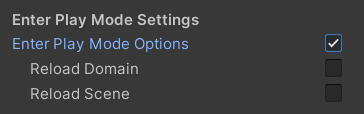
<p>In the end, the goal of having a functional IL2CPP build of the application with managed stripping level set to <code class="language-plaintext highlighter-rouge">High</code> was achieved. Ensuring a successful build in CI is a good start, but actually running that build can save time down the road. This can even be <em>Play Mode</em> tests configured to run on the target platform.</p>]]></content><author><name>Colt Bauman</name></author><category term="Code Journal" /><category term="unity" /><category term="il2cpp" /><summary type="html"><![CDATA[It’s usually a good idea to test built versions of your application regularly because code will often behave differently than in the editor. Doing this regularly helps to easily pinpoint when a bug was introduced avoid “surprises” when someone requests a build]]></summary></entry><entry xml:lang="en"><title type="html">Enter Play Mode Faster</title><link href="https://cabauman.github.io/ko/domain-reload/" rel="alternate" type="text/html" title="Enter Play Mode Faster" /><published>2023-11-08T00:00:00+00:00</published><updated>2023-11-08T00:00:00+00:00</updated><id>https://cabauman.github.io/domain-reload</id><content type="html" xml:base="https://cabauman.github.io/domain-reload/"><![CDATA[<p>Disable domain reloading for quicker iteration time during development (if you have to frequently enter and exit play mode). Open Project Settings -&gt; Editor, scroll all the way down, and enable the “Enter Play Mode Options” checkbox while leaving the 2 child checkboxes unchecked. The only thing you have to be aware of is static fields and event handler that won’t get reset. The docs have a helpful section to assist: <a href="https://docs.unity3d.com/Manual/DomainReloading.html">Domain Reloading</a>.</p>

<p>It won’t be realistic for bigger projects, but still comes in really handy in certain cases, especially when prototyping and for small projects. SceneManager.sceneLoaded event can be enabled by enabling the “Reload Scene” checkbox.</p>

<p><img src="/assets/images/disable-domain-reload.png" alt="disable-domain-reload" /></p>

<p>Domain Reload On</p>

<video width="480" controls="controls">
  <source src="/assets/videos/domain-reload-on.mp4" type="video/mp4" />
</video>

<p><br />
Domain Reload Off</p>

<video controls="">
  <source src="/assets/videos/domain-reload-off.mp4" type="video/mp4" />
</video>]]></content><author><name>Colt Bauman</name></author><category term="Unity Tips" /><category term="unity" /><category term="unity-tip" /><summary type="html"><![CDATA[Disable domain reloading for quicker iteration time during development (if you have to frequently enter and exit play mode). Open Project Settings -&gt; Editor, scroll all the way down, and enable the “Enter Play Mode Options” checkbox while leaving the 2 child checkboxes unchecked. The only thing you have to be aware of is static fields and event handler that won’t get reset. The docs have a helpful section to assist: Domain Reloading.]]></summary></entry><entry xml:lang="en"><title type="html">TextMeshPro Stylesheets</title><link href="https://cabauman.github.io/ko/tmp-stylesheets/" rel="alternate" type="text/html" title="TextMeshPro Stylesheets" /><published>2023-11-03T00:00:00+00:00</published><updated>2023-11-03T00:00:00+00:00</updated><id>https://cabauman.github.io/tmp-stylesheets</id><content type="html" xml:base="https://cabauman.github.io/tmp-stylesheets/"><![CDATA[<p>Use TextMeshPro’s “Font Weights” feature + stylesheets to simplify working with specs set by the design team.</p>

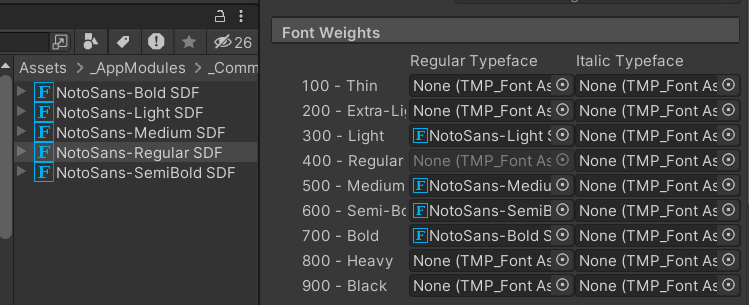
<p><strong>Font Weights</strong></p>

<p>When you import a family of fonts, don’t explicitly reference them all in the TMP components. Instead, make the Regular font style reference all the variations.</p>

<p><img src="/assets/images/tmp-stylesheets2.png" alt="tmp-stylesheets2" /></p>

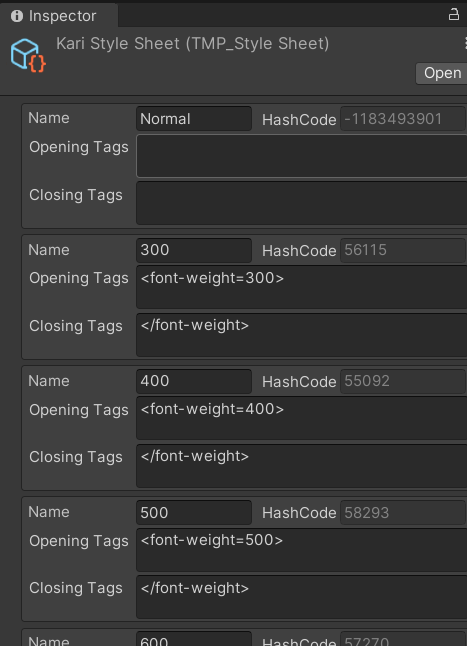
<p><strong>Stylesheets</strong></p>

<p>Create a stylesheet to add snippets for each weight (300, 400, etc.), or any other combination of markdown tags.</p>

<p><img src="/assets/images/tmp-stylesheets4.png" alt="tmp-stylesheets4" /></p>

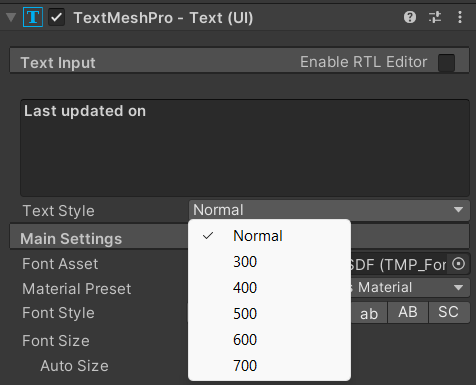
<p>These will appear in the “Text Style” dropdown right below the text.</p>

<p><img src="/assets/images/tmp-stylesheets3.png" alt="tmp-stylesheets3" /></p>

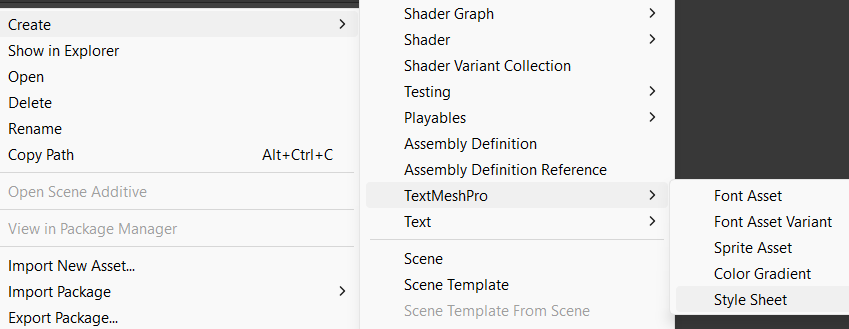
<p>To get started, open the Asset menu and go to Create -&gt; TextMeshPro -&gt; Style Sheet</p>

<p><img src="/assets/images/tmp-stylesheets5.png" alt="tmp-stylesheets5" /></p>

<p>After customizing the stylesheet, set both the font and stylesheet as defaults in TextMeshPro PlayerSettings.</p>

<p><img src="/assets/images/tmp-stylesheets1.png" alt="tmp-stylesheets1" /></p>]]></content><author><name>Colt Bauman</name></author><category term="Unity Tips" /><category term="unity" /><category term="unity-tip" /><summary type="html"><![CDATA[Use TextMeshPro’s “Font Weights” feature + stylesheets to simplify working with specs set by the design team.]]></summary></entry><entry xml:lang="en"><title type="html">Visual Studio Tracepoints</title><link href="https://cabauman.github.io/ko/vs-tracepoints/" rel="alternate" type="text/html" title="Visual Studio Tracepoints" /><published>2023-03-11T00:00:00+00:00</published><updated>2023-03-11T00:00:00+00:00</updated><id>https://cabauman.github.io/vs-tracepoints</id><content type="html" xml:base="https://cabauman.github.io/vs-tracepoints/"><![CDATA[<p>You know those fleeting logs you scatter around when trying to debug an issue? A couple downsides are</p>
<ul>
  <li>compilation time every time you need to add or modify a log</li>
  <li>have to remember to remove them when finished (unless they’re useful enough to keep around)</li>
</ul>

<p><img src="/assets/images/vs-tracepoints.png" alt="vs-tracepoints" /></p>

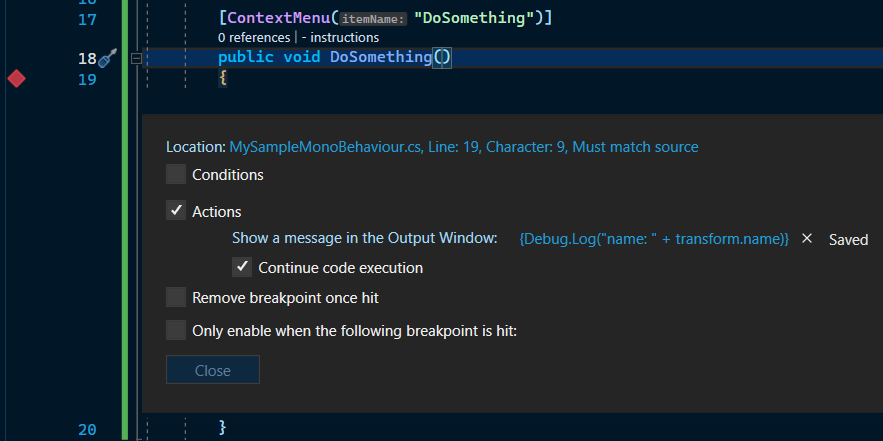
<p>Well, instead of putting those logs in the code, try moving them to a <a href="https://devblogs.microsoft.com/visualstudio/tracepoints/" target="_blank">special kind of breakpoint known as a Tracepoint</a>. Its primary use case is printing text to the Visual Studio console, but it also allows us to execute methods by putting the invocation inside a pair of curly braces. We can utilize this by calling Unity’s Debug.Log:</p>

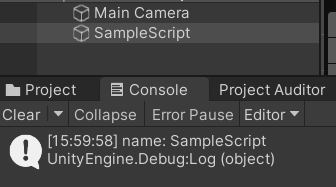
<div class="language-csharp highlighter-rouge"><div class="highlight"><pre class="highlight"><code><span class="p">{</span><span class="n">Debug</span><span class="p">.</span><span class="nf">Log</span><span class="p">(</span><span class="s">"value: "</span> <span class="p">+</span> <span class="n">transform</span><span class="p">.</span><span class="n">name</span><span class="p">)}</span>
</code></pre></div></div>

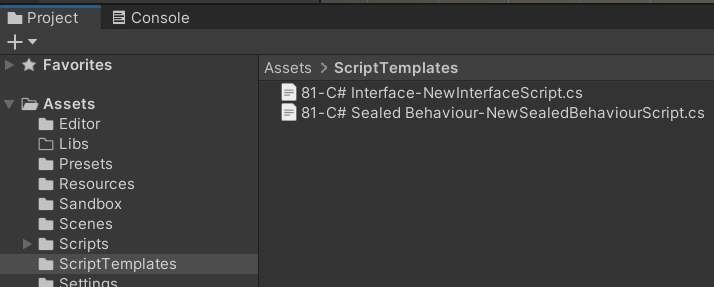
<p><img src="/assets/images/vs-tracepoints2.png" alt="vs-tracepoints2" /></p>]]></content><author><name>Colt Bauman</name></author><category term="Unity Tips" /><category term="unity" /><category term="unity-tip" /><category term="visual-studio" /><summary type="html"><![CDATA[You know those fleeting logs you scatter around when trying to debug an issue? A couple downsides are compilation time every time you need to add or modify a log have to remember to remove them when finished (unless they’re useful enough to keep around)]]></summary></entry><entry xml:lang="en"><title type="html">Script Templates</title><link href="https://cabauman.github.io/ko/script-templates/" rel="alternate" type="text/html" title="Script Templates" /><published>2023-03-08T00:00:00+00:00</published><updated>2023-03-08T00:00:00+00:00</updated><id>https://cabauman.github.io/script-templates</id><content type="html" xml:base="https://cabauman.github.io/script-templates/"><![CDATA[<p>You may already know about the script templates folder <a href="https://support.unity.com/hc/en-us/articles/210223733-How-to-customize-Unity-script-templates" target="_blank">in the installation directory</a>, but did you also know that “ScriptTemplates” is a special folder name in a Unity project?</p>

<p><img src="/assets/images/script-template1.png" alt="script-template1" /></p>

<p>You can include custom templates per project.</p>

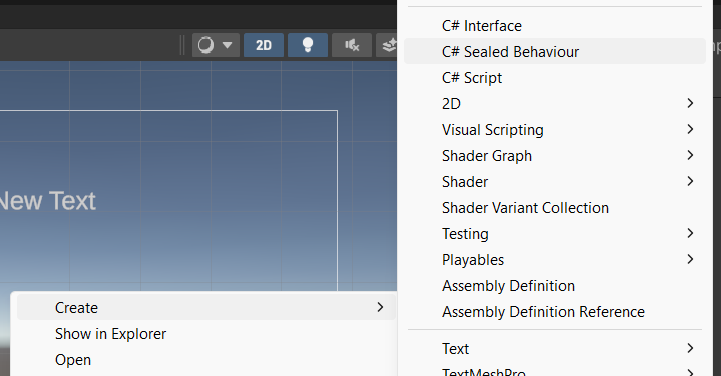
<p><img src="/assets/images/script-template2.png" alt="script-template1" /></p>

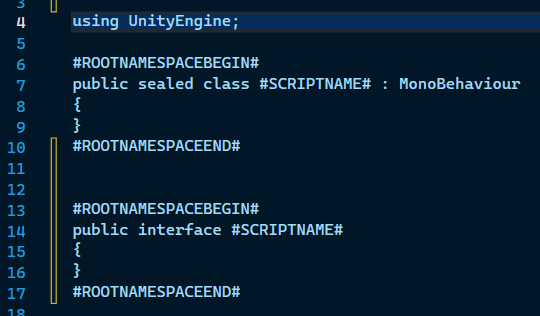
<p>Without templates, one of the first things I do for many new scripts is remove the default Start and Update methods, along with the comments. In the attached screenshots I use an interface template and a “classes sealed by default” template.</p>

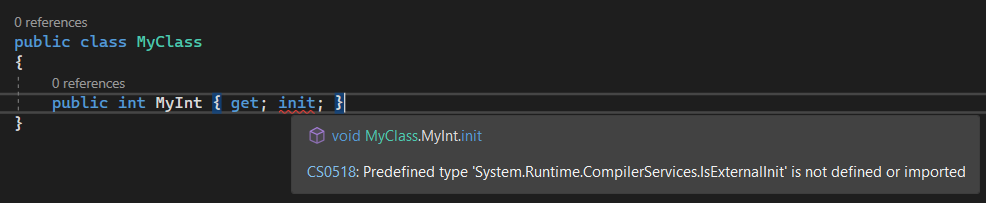
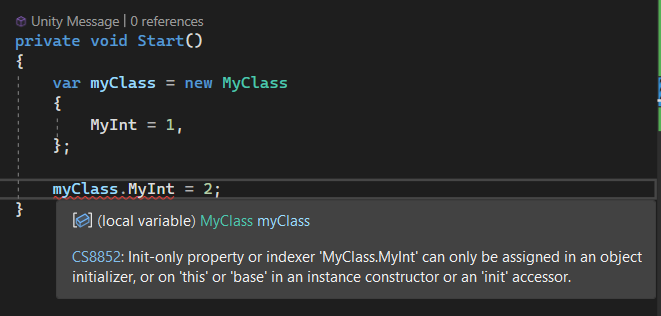
<p><img src="/assets/images/script-template3.png" alt="script-template1" /></p>]]></content><author><name>Colt Bauman</name></author><category term="Unity Tips" /><category term="unity" /><category term="unity-tip" /><summary type="html"><![CDATA[You may already know about the script templates folder in the installation directory, but did you also know that “ScriptTemplates” is a special folder name in a Unity project?]]></summary></entry><entry xml:lang="en"><title type="html">Init Keyword in Unity</title><link href="https://cabauman.github.io/ko/init-keyword/" rel="alternate" type="text/html" title="Init Keyword in Unity" /><published>2023-03-03T00:00:00+00:00</published><updated>2023-03-03T00:00:00+00:00</updated><id>https://cabauman.github.io/init-keyword</id><content type="html" xml:base="https://cabauman.github.io/init-keyword/"><![CDATA[<p>C# 9 introduced the init keyword which can be applied to properties and indexers. This means the value can only be set during object initialization (unlike set). Unity supports C# 9 since 2021.2, but you’ll notice the init keyword doesn’t work right out of the box.</p>

<p><img src="/assets/images/unitytip-init.png" alt="Image Click Area" /></p>

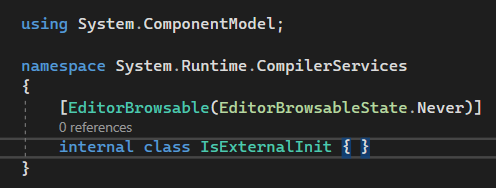
<p>The compiler complains about missing something called IsExternalInit. If you search online, you’ll find a small snippet of code that you can add to your project to fill in the missing piece.</p>

<p><img src="/assets/images/unitytip-init2.png" alt="Image Click Area" /></p>

<p>Of course, MonoBehaviours can’t benefit from this feature, but still a lot of use cases. Immutable properties ftw!</p>

<p><a href="https://lnkd.in/gep2ARvk" target="_blank">init keyword docs</a></p>

<p><a href="https://stackoverflow.com/questions/62648189/testing-c-sharp-9-0-in-vs2019-cs0518-isexternalinit-is-not-defined-or-imported/62656145#62656145" target="_blank">IsExternalInit snippet</a></p>

<p><img src="/assets/images/unitytip-init3.png" alt="Image Click Area" /></p>]]></content><author><name>Colt Bauman</name></author><category term="Unity Tips" /><category term="unity" /><category term="unity-tip" /><category term="c#" /><summary type="html"><![CDATA[C# 9 introduced the init keyword which can be applied to properties and indexers. This means the value can only be set during object initialization (unlike set). Unity supports C# 9 since 2021.2, but you’ll notice the init keyword doesn’t work right out of the box.]]></summary></entry><entry xml:lang="en"><title type="html">Image Click Area</title><link href="https://cabauman.github.io/ko/image-click-area/" rel="alternate" type="text/html" title="Image Click Area" /><published>2023-03-01T00:00:00+00:00</published><updated>2023-03-01T00:00:00+00:00</updated><id>https://cabauman.github.io/image-click-area</id><content type="html" xml:base="https://cabauman.github.io/image-click-area/"><![CDATA[<p>When creating image buttons, it’s sometimes desirable to make the clickable area bigger than the image. One common approach to achieve this is adding an additional GameObject + Image component, setting the desired clickable area size, and making it completely transparent. But we actually don’t need those extra objects. Instead, utilize the Raycast Padding property of the Image component. The editor conveniently shows the bounds via Gizmo (the white square surrounding the image).</p>

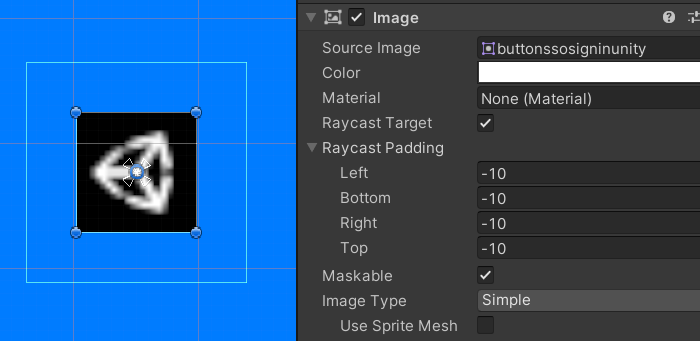
<p><img src="/assets/images/image-click-area.png" alt="Image Click Area" /></p>]]></content><author><name>Colt Bauman</name></author><category term="Unity Tips" /><category term="unity" /><category term="unity-tip" /><category term="ugui" /><summary type="html"><![CDATA[When creating image buttons, it’s sometimes desirable to make the clickable area bigger than the image. One common approach to achieve this is adding an additional GameObject + Image component, setting the desired clickable area size, and making it completely transparent. But we actually don’t need those extra objects. Instead, utilize the Raycast Padding property of the Image component. The editor conveniently shows the bounds via Gizmo (the white square surrounding the image).]]></summary></entry></feed>